RTC Contest Tips

Welcome to the RTC Contest!

We believe the RTC Contest represents the future of ham radio contesting. We want you to enjoy participating in a relaxed and enjoyable manner, so we have prepared a few tips to help you avoid common mistakes.

  1. Set up your logger with the correct RTC login

The very first step is to configure your logger with the proper login credentials for the RTC server (HAMSCORE.com).

  • Log in to HAMSCORE.com
  • Go to your Profile page and locate your personal RTC PIN
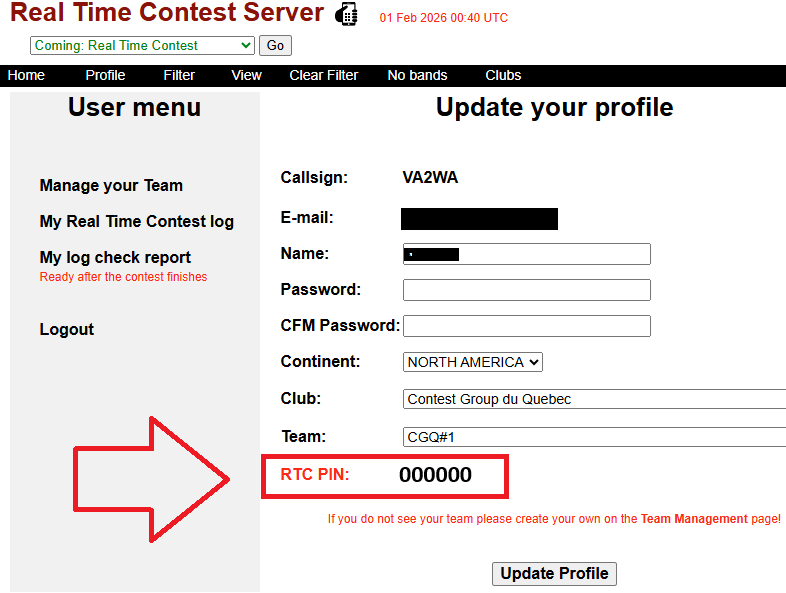
  • In your logger’s RTC login form, enter: Your callsign and Your RTC PIN

⚠️ Important:
The callsign entered in your logger must match the RTC log owner’s callsign exactly. Logs with mismatched callsigns will not be accepted.

2. Set up the correct exchange (very important)

The RTC exchange consists of two parts:

  • A serial number
  • A 4-character grid locator

Example:
001 FN36

Please refer to your logger’s documentation to ensure the exchange is configured correctly.
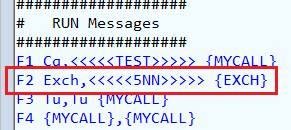
For example, in N1MM+, it should be set up as follows for the RTC Contest:
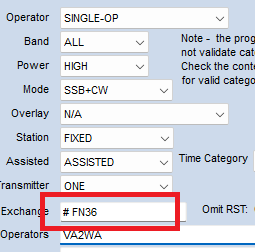
Don’t forget to split the N1MM+ serial number macro # and your 4-character grid identifier.

For CWT:
The exchange should include your name and your CWOps number or your 2-character US state or Canadian province abbreviation, or your official DXCC identifier such as DL, I, PY, etc. Some operators may also use CWA.


Don’t forget to separate your name and the second exchange field with a space!

For MST:
The exchange should include your name and either your 2-character US state or Canadian province abbreviation, or your official DXCC identifier.


Don’t forget to separate your name and geographic ID with a space!

3. Verify your online reporting scoring URL

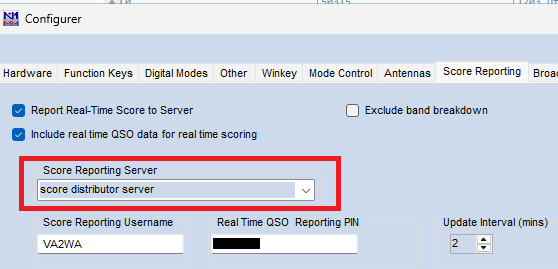
The online reporting URL in your logger should be configured with the “Score Distributor Server” or whatever it’s called in a logger.

For example at N1MM+ it looks like :
4. Verify your online log before the contest

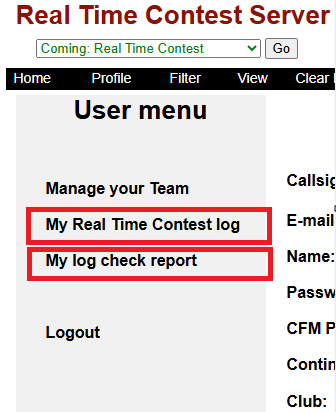
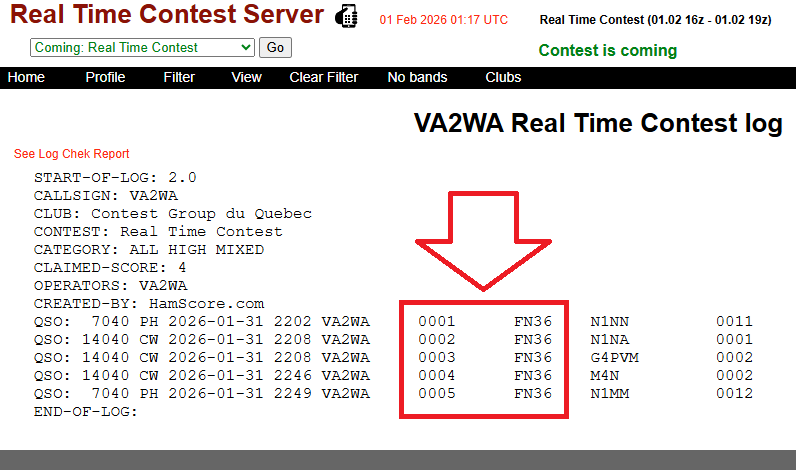
A link to your RTC log is available on your Profile page.

  • Enter a few “virtual” QSOs in your logger
  • Wait for your logger to send them to the RTC server
  • Verify that your exchange appears correctly in the online log
5. Understand the scoreboard during the contest

Once the contest starts, the RTC adjudication module begins cross-checking logs within a few minutes.

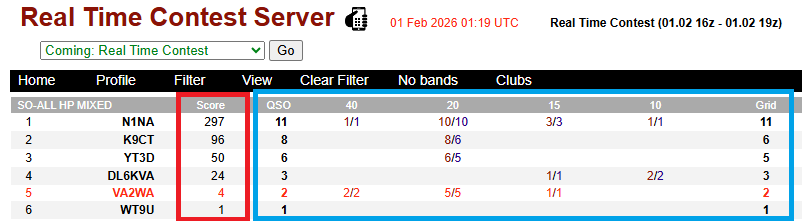
  • Score column (red frame):
    This is the calculated RTC score, based on your log and the online logs from your correspondents received so far.
    Because of cross-checking, this score may be slightly delayed and often lower than what you see in your logger.
  • Logger data (blue frame):
    This shows the data exactly as sent by your logger, without adjustment.

This separation is intentional and helps prevent any form of online assistance during the contest.
This separation is intentional and helps prevent any form of online assistance during the contest.

6. If you see EXCH instead of numeric score

If the scoreboard displays EXCH instead of a number, it indicates an exchange error.
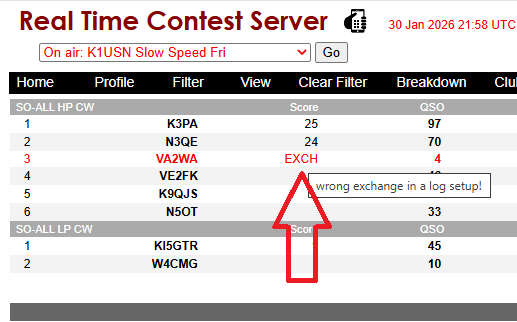
  • Click on EXCH to open your contest log in a new browser tab
  • Review the log to identify the incorrect exchange
  • Correct the exchange in your logger
  • Re-submit the log

For example for N1MM+ :
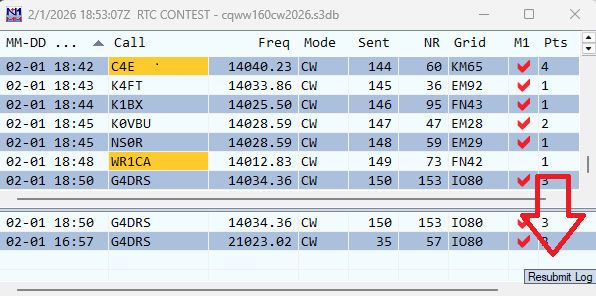
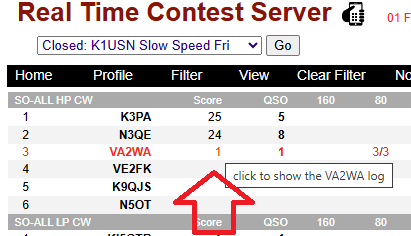
Once a corrected log is received, the score will be recalculated and the EXCH indicator will disappear.

7. After the contest finishes

Final contest results are typically published 10–12 minutes after the contest ends.

From your Profile page, you can:

  • View your UBN report
  • Download your submitted log

After the contest concludes, all online logs will be published and visible to every logged-in user.
8. Test your logger in weekly mini contests

To be 100% sure in your logger setup we recomend you to join our weekly recurrent online services :

Monday:

K1USN Slow Speed 00z -01z

ICWC-MST 1 13z – 14z

ICWC-MST 2 19z – 20z

Tuesday:

ICWC-MST 3 03z – 04z

Wednesday:

CWOps Mini-CWT 1 13z – 14z

CWOps Mini-CWT 2 19z – 20z

Thursday:

CWOps Mini-CWT 3 03z – 04z

CWOps Mini-CWT 4 07z – 08z

Friday:

Weekly RTTY1 01:45z – 02:15z

K1USN Slow Speed 20z -21z

Thank you for joining us! We belive the RTC is the HAM Radio Contesting future!
Real Time Contest (RTC) rules

1. General 

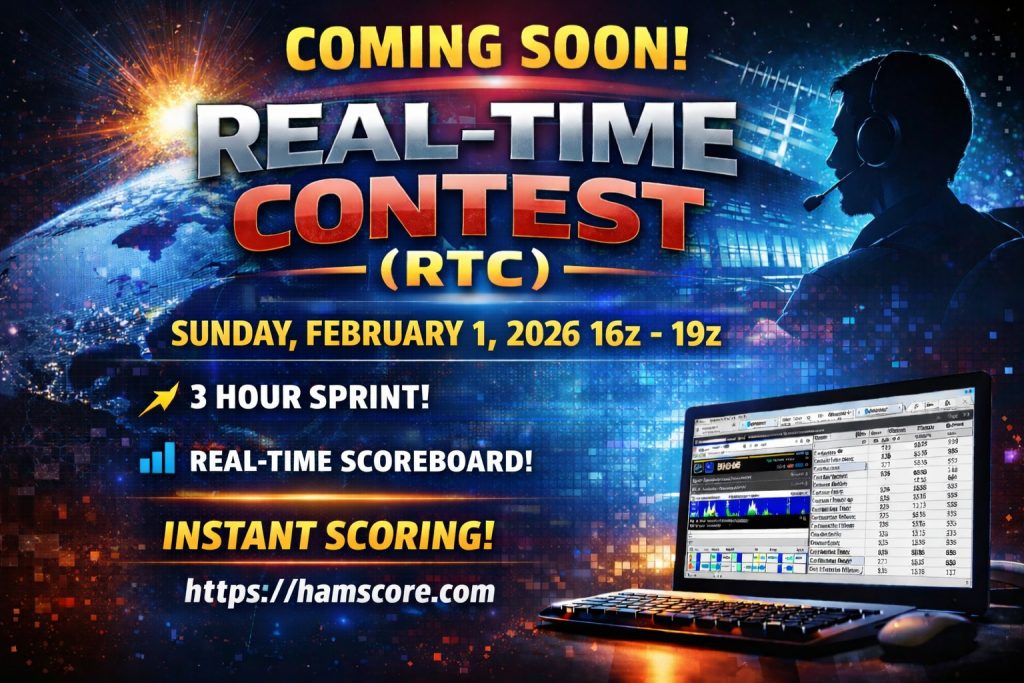
The Real Time Contest (RTC) is a global amateur radio event built for exciting, live, and fully interactive competition. Everyone is welcome to join the action! To ensure real-time scoring and official results, participants must stay connected to the official RTC server https://hamscore.com for the entire duration of the contest.

The contest will be in a mixed mode format (CW and SSB). Each station may be worked only once per band, regardless of mode — CW or SSB.

Bands: 40m, 20m, 15m, 10m.

Cabrillo name: RTC

2. Contest Duration

Total duration: 4 hours 

The next provisional schedule:  Sunday, May 24 2026 at 16:00 UTC – 20:00 UTC *

* We are planning to hold the RTC contest twice a year – once in the winter/spring period and once in the fall. The contest duration may also be adjusted in the future. Our goal is to eventually adopt a full 24-hour format, depending on the level of participation and overall contest activity

3. Exchange

Each QSO must include the following exchange:

QSO serial number, starting with 001

4-character grid locator

Signal reports (59 / 599) or any other reports should also be present but they are not be checked as a part of exchange.

Example: 599 001 FN36 or 59 001 FN36

4. Scoring

QSO Points (distance-based):

1 point — up to 1,999.99 km

2 points from 2,000.00 up to 3,999.99 km

3 points — from 4,000.00 up to 7,999.99 km

4 points — from 8,000.00 km and over **

** Distance is calculated between centers of 4-character Maidenhead  locator ( major square ) by using the Haversine formula. For example: The distance between FN36 and DM18 is: 3664.72 km

Multipliers:

The number of unique 4-character grid locators worked per band.

Final scores:

– Will be calcualated:   Total score = QSO points X Multiplier

Final scores will be available online at https://hamscore.com/ approximately 10 minutes after the contest ends, following the correction period.

Valid QSOs:

A QSO is considered valid if:

– All QSO data matches after cross-checking with the corresponding station’s online log, or

– The QSO was made with an offline station, and the callsign appears in at least one other online log (OFFCALL).

QSO is not valid for scoring (0 points and no multiplier) if:

– The QSO is with a UNIQUE callsign

– The callsign is busted

– The received exchange is incorrect

– The QSO time difference between logs exceeds 2 minutes

– The QSO is logged on the wrong band

– The QSO is logged with one or both Exchange fields empty

– The QSO is logged with sent or reseived QSO serial number 0

A callsign is considered UNIQUE if the station was offline during the contest, and the callsign does not appear in any other online log

Penalties:

There are no additional penalties for:

– QSOs with busted callsigns

– QSOs with incorrect exchanges

Invalid QSOs simply receive zero points and no multiplier.

The operator is responsible for ensuring that the logger is configured correctly. The RTC server provides several clear indicators when the sent exchange is incorrect. If the log is not configured with the correct exchange before the contest finishes, the entire log will be considered invalid and will not be counted in the final results. In such cases, “EXCH” will be published in the score column instead of the claimed score.

In that case the corresponding QSO will still be considered valid without an exchange check, if the QSO time, band, and mode match.

5. Categories

Multy Two Operator High Power (M2 HP) 

Multi Operator Low Power (M2 LP)

Single Operator High Power (SO HP) 

Single Operator Low Power (SO LP)

Single Operator (SO QRP)

6. Transmitter Limitations

HP (High Power): Output power greater than 100 watts.

LP (Low Power): Output power of 100 watts or less.

QRP: Output power of 10 watts or less for CW or SSB.

Single Operator: Only one signal may be transmitted at any given time.

Multi-Operator: A maximum of two signals may be transmitted simultaneously, and only on different bands.

7. Band Changes and Other Conditions

Self-spotting is permitted for all participants.

There are no restrictions on band changes for either Single Operator or Multi-Operator categories.

Spotting assistance is permitted in all categories.

8. Trophies

Plaques will be awarded for:

Top Score Multi-Operator High Power (Any mode)

Top Score Multi-Operator Low Power (Any mode)

Top Score Single-Operator High Power (Any mode)

Top Score Single-Operator Low Power (Any mode)

Top Score Single-Operator QRP (Any mode) Sponsor:

Suggestions for sponsoring trophies are welcome!

We are planning to have more categories split by modes in future. We have also an idea to nominate the only continental winners and skip overall World winner. To be updated.

7. Eligibility:

Only stations actively reporting to the RTC server during the contest are eligible for trophies.

8. Logger setup suggestions:

For N1MM+ users:

Please get the RTC Contest UDC file at https://n1mmwp.hamdocs.com/mmfiles/rtc-udc-rev-2/

The RTC log should be set up with the following exchange settings: # <4-charcter grid location. Please don’t forget to put a space between # and the grid.

For example:

To add RST to your exchange in CW, setup your CW messages like on this example:

For DXlog users:

For those wanting to play with DXLog in the upcoming test, you should use devtest 2.6.26.4 at https://dxlog.net/sw/files/download/devtest/DXLog.net-DEVTEST-2.6.26.4.msi

To add RST to your exchange, reset your standard messages to default.

For SDC logger users:

Please download the latest. The RTC contest is supported started from the version 19.0505 . It could be downloaded at https://www.lw-sdc.com/?page_id=79

For QARTest logger users:

Please download the latest. The RTC contest is supported started from the version 16.1.1 . It needs also QAR2GetScores version 2.0.4 (the latest). It could be downloaded at https://www.ik3qar.it/software/qartest/en/download/